


Meet Cole.
    Your AI assistant,
    right in your chats.

    Handle reminders, email, calendar and research from WhatsApp, LINE, Slack and the other chats you already use.

    Cole - AI Chief of Staff
    WhatsApp · 2 follow-ups done
    7
    channels incl. paid voice
    150
    credits to try Cole
    Groups
    and private chats
    0
    card needed to start
    Lives inSlackTeams (coming soon)WhatsAppTelegramiMessageLINEEmail
    Trusted by
    ZiffyHomes
    BLACK LABELMEDIA
    NextAgency↗
    CrèmeMedia
    ANALOG
    Upskill Media
    Cole at work

    Watch Cole work
    in every channel your team uses.

    Not five different bots. One Cole, five surfaces. Same memory underneath. Click any channel below - or watch them rotate.

    Illustrative conversations with fictional outcomes. Share context only with its intended audience.

    Workplace chat
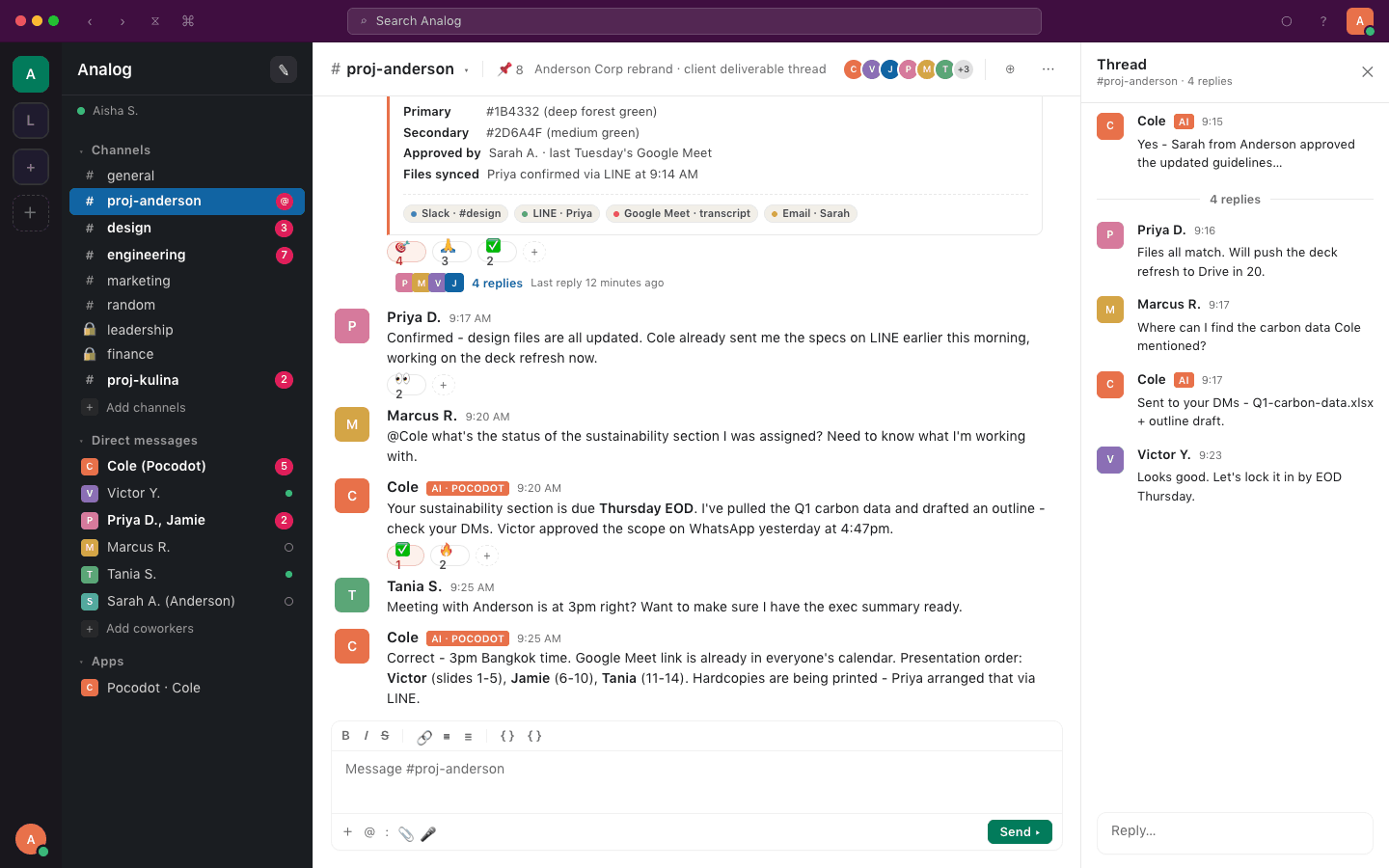
    Same Cole - Slack

    “Marcus, the sustainability section is due Thursday EOD. Victor approved the scope on WhatsApp yesterday.”

    - Cole, in workplace chat - Cole pulls Victor's WhatsApp approval into a Slack reply.

    Start right in your chat.

    Message Cole on WhatsApp or LINE and say hi. Either way you get 150 free credits, no card.

    On WhatsApp

    Cole replies with a link to sign up. Sign up, reply YES when Cole asks in the chat, and Cole answers your message.

    Message Cole on WhatsApp

    On LINE

    Add Cole as a friend and say hi. Cole replies with a Start card: sign in with LINE from it, no website sign-up needed.

    Add Cole on LINE (@pocodot)
    What Cole actually does

    Not “AI features.”
    Real work, shipped.

    The kind of work you'd normally hand off to a Chief of Staff, an EA, or a junior ops hire. Cole closes the loop - and tells you when it's done.

    Illustrative workflows. Availability depends on connected accounts, permissions and plan; example transactions are simulated.

    Drafts your investor update

    Pulls revenue, burn, pipeline from your tools. Writes it in your voice. You hit send.

    Inbox - Cole
    Y
    You
    Cole, draft May investor update.
    C
    ColeAI
    Drafted. ARR $312K (+14%), burn -8%, 3 new logos. In your outbox.
    INVESTOR-UPDATE-MAY.PDF

    Joins your standup

    Dials in to Meet or Zoom, takes the notes, captures decisions, posts to Slack + email.

    #proj-anderson - Slack
    C
    ColeAI
    Standup notes: 3 decisions, 5 action items. Posted to #proj-anderson.
    C
    ColeAI
    Followup reminders set for Jamie, Marcus, Tania.
    10:00 MEETING NOTES

    Triages your inbox

    Batches your WhatsApp pings, flags the urgent iMessage, drafts replies to the long Slack thread.

    Team chat - WhatsApp
    Y
    You
    Cole, what needs me today?
    C
    ColeAI
    4 things. Sarah's contract (urgent), 2 vendor follow-ups (drafted), 1 hiring decision.
    12 → 4 things

    Coordinates with your vendor

    Print shop on LINE, designer on Slack, client on email - Cole keeps every external thread in sync with internal.

    Cole - LINE
    P
    Priya
    Cole, where should I upload the financials?
    C
    ColeAI
    Drive folder linked. Victor and Jamie are in. Printer briefed via email at 3:31pm.
    4 external threads - in sync

    Books your travel

    Founder ask, calendar check, flight search, hotel match, calendar invite. Itinerary in your inbox.

    Cole - iMessage
    Y
    You
    NYC next Tue. Cole, handle it.
    C
    ColeAI
    Best option is $812. Reply approve 7K2M and I book it.
    Y
    You
    approve 7K2M
    C
    ColeAI
    Booked. JFK 8:05am, Hotel Beekman, return Thu 6pm. Cal invite sent. $812.
    ITINERARY.PDF - $812

    Signs in and buys it, after you approve the total

    Cole has his own browser. He signs in with a login from your Vault, gets to the checkout, tells you the exact total, and pays only when you say so.

    Team chat - WhatsApp
    Y
    You
    Order the Dyson filter from Lazada to the office.
    C
    ColeAI
    In the cart: THB 1,290.00 incl. delivery, paying with Visa 4242. Reply approve XK7Q to pay, or reject XK7Q.
    Y
    You
    approve XK7Q
    C
    ColeAI
    Paid. Order 5581-2209, arriving Thursday. Listed under Cards.
    THB 1,290.00 - APPROVED

    Runs the follow-ups

    You promised it Tuesday. Cole nudges them, them, and you. Closes the loop when the last signature lands.

    #proj-anderson - Slack
    C
    ColeAI
    Nudged Tobias (3 days), Jamie (2 days), Sarah (today). Will close out when Sarah replies.
    C
    ColeAI
    Sarah just replied. Loop closed. Approval logged in the proj-anderson record.
    LOOP CLOSED
    Cole + the team

    One conversation.
    Six specialists behind it.

    You talk to Cole. Cole delegates to the right specialist for the job - research, writing, design, sales, support, or finance. You never have to manage them.

    S
    Scout
    RESEARCHER
    • Competitor scans
    • Market briefs
    • Source verification
    Q
    Quill
    COPYWRITER
    • Investor updates
    • Launch copy
    • Email drafts in your voice
    P
    Pixel
    DESIGNER
    • Decks & one-pagers
    • Brand-consistent artwork
    • Quick mocks
    X
    Closer
    SALES REP
    • Outbound sequences
    • CRM hygiene
    • Pipeline pulse
    E
    Echo
    SUPPORT AGENT
    • Tier-1 triage
    • Tone-matched replies
    • Loops Cole in when needed
    L
    Ledger
    FINANCE ANALYST
    • Board pack assembly
    • Invoice triage
    • Forecast refresh

    Cole picks who to call on based on what you asked. No setup, no routing rules - just ask.

    The wedge

    Cole remembers what your
    team said - even when
    you weren't in the room.

    1 - 2:14pm - in WhatsApp
    Team chat - WhatsApp
    V
    Victor
    Just got off the call with Anderson CEO. They want sustainability added to the deck. Cole - let the team know.
    C
    ColeAI
    Got it. I'll loop Marcus on Slack and brief Tania.
    2 - 3:47pm - in Slack
    #proj-anderson - Slack
    M
    Marcus
    @cole what's the status of the sustainability section I was assigned?
    C
    ColeAI
    Due Thursday EOD. Victor approved the scope on WhatsApp at 2:14pm. I've drafted the outline - in your DMs.

    Choose what context belongs in a shared workflow.
    Cole lives wherever your team is talking - and remembers.

    7
    channels, including voice on paid plans
    150
    credits to try Cole
    Groups
    and private chats
    0
    payment cards needed to start

    Your team's data stays yours.

    Security  -  Privacy  -  Compliance

    Review access

    Check which accounts and permissions each workflow needs.

    Security documentation

    Read the published controls and discuss your requirements with us.

    Privacy and data

    See how data is processed and how to request deletion.

    Two ways to hire Cole

    Just you? Or your
    whole team?

    Cole works the same way either way. The only difference is whether it's your shared brain - or your team's.

    /cole

    For yourself

    Your AI Chief of Staff

    Founders, solos, and one-person businesses. Cole shows up in your DMs, your inbox, your iMessage. Same brain across all of them.

    • Drafts your investor updates and emails
    • Books your travel and handles your calendar
    • Triages your inbox and runs follow-ups
    • Joins your meetings, captures the notes
    /teams

    For your team

    Cole as your AI teammate

    Workspaces, agencies, and distributed teams. Add Cole to your team channels - Slack, WhatsApp, LINE - and your team coordinates without you in the middle. Microsoft Teams is coming soon.

    • Anyone on your team can @mention Cole
    • One memory across every channel
    • Vendor coordination, client threads, kickoffs
    • Auto-posts meeting notes everywhere
    How it works

    Onboarding a teammate
    starts with your workflow.

    Connect an account, make a request and check the result. Setup time depends on your channels and permissions.

    /01

    Connect

    Connect a supported channel, then the tools your task needs. Review permissions; some providers need administrator approval.

    #proj-anderson - Slack
    Y
    You
    Connect Pocodot to our Slack and WhatsApp.
    C
    ColeAI
    Connected. I'm now in #proj-anderson and the Anderson Project Team WhatsApp group.
    /02

    @mention

    Anyone on your team - in any channel - pings Cole like a colleague. No tab to switch. No new app to learn.

    Team chat - WhatsApp
    M
    Marcus
    @cole did Victor approve the sustainability scope?
    C
    ColeAI
    Yes - Victor confirmed on WhatsApp at 2:14pm. Due Thursday EOD.
    /03

    Cole shows up - everywhere

    One conversation in Slack updates the WhatsApp group. One meeting note posts to email. Same brain, every channel.

    Cole - iMessage
    C
    ColeAI
    Notes posted to #proj-anderson, the WhatsApp group, and emailed to 7 attendees.
    C
    ColeAI
    Follow-up reminders queued for Jamie, Marcus, Tania, Priya.
    Workflow discovery

    Cole finds the workflows.
    You just approve them.

    No template library to browse. Cole watches how your team works, spots repetitive patterns, and proposes automations tailored to you.

    Cole observes

    Cole reads your Slack channels, email, and calendars - learning how your team actually works.

    Cole proposes

    When Cole spots a pattern that could be automated, he sends you a proposal with a clear benefit.

    You approve

    Approve and it runs. Reject and Cole learns. Every workflow is custom to your team - not a template.

    CColeOps

    Weekly client status report

    Cole noticed you pull updates from Slack, email, and meetings every Friday - and suggested automating it.

    SlackEmailMeet
    Approve to activate
    CCloserSales

    Outbound prospecting sequence

    Closer spotted 12 leads going cold after first touch - and proposed a 3-step follow-up cadence.

    EmailLinkedIn
    Approve to activate
    SScoutResearch

    Competitor intel brief

    Scout detected 3 competitor launches last month that your team discussed manually - and offered to automate weekly monitoring.

    Slack
    Approve to activate
    CColeComms

    Meeting notes to action items

    Cole saw decisions being lost after standups - and proposed capturing action items and posting to each owner's channel.

    MeetSlackWhatsApp
    Approve to activate
    LLedgerFinance

    Invoice triage & approval

    Ledger found invoices sitting unread for 5+ days - and suggested auto-routing to the right approver with follow-up.

    EmailSlack
    Approve to activate
    CColeOps

    Vendor follow-up chain

    Cole noticed vendors going quiet after commitments on LINE and WhatsApp - and proposed 48-hour nudge automations.

    LINEWhatsAppEmail
    Approve to activate

    Cole vs AI tools

    Your AI stack is impressive.
    Your to-do list hasn't noticed.

    Illustrative Cole workflows. Compare the same task, permissions and completion evidence; these examples are not benchmark results.

    Copilot

    Works with Microsoft 365 content and agents.

    Compare recap, task and follow-up actions available in your Microsoft 365 plan.

    Check available actions
    vs
    Cole
    ColePocodot

    Chief of Staff · across every channel

    Writes the recap , assigns the tasks and follows up with each person.

    Recap sentTasks assignedFollow-ups done

    What our customers say.

    Customer testimonial · Individual experience

    “Hundreds of group chats across Slack, WhatsApp, Telegram, LINE - plus the follow-ups I need to remember. Cole holds all of it so I can actually rest easy.”
    Victor Young, Founder of Analog

    Victor Young

    Founder, Analog

    Don't take our word for it

    Ask another AI
    what it thinks of Cole.

    Pick your favorite AI and ask. No filter, no spin. (We know - only a company very sure of itself would do this.)

    FAQ

    The fine print,
    in plain language.

    If you don't see your question here, talk to Cole - he knows the rest.

    Cole is Pocodot’s AI coworker for research, writing, email, scheduling and connected tasks in messaging channels. Available actions depend on your plan, connected accounts and permissions.

    Start free. Pay only when you love it.

    Try it with free credits. No card needed. Upgrade when you're ready.

    Free

    Best for: Trying your first agent

    $0/mo

    150 free credits to start (one-time)

    No credit card. Ever.

    What's included:

    • 150 free credits to start (one-time)
    • 6 channels (Slack, WhatsApp, Telegram, LINE, iMessage, Email); voice calling on paid plans; Microsoft Teams coming soon
    • Pocodot watermark
    • Community support
    Most Popular

    Pro

    Best for: Growing teams

    $49/mo

    8,000 credits/month

    What's included:

    • 8,000 credits/month
    • 2,000 credit rollover
    • Priority support

    Max

    Best for: Scaling fast

    $199/mo

    36,000 credits/month

    What's included:

    • 36,000 credits/month
    • Everything in Pro
    • 5,000 credit rollover
    • Dedicated support

    See full pricing →

    Or earn free credits - Invite a friend - you both earn 500 credits →

    Invite a friend - you both earn 500 credits

    Share your link. When they upgrade to a paid plan, you both earn 500 credits.

    Learn more

    Latest from Cole

    Product updates and practical guides for working with Cole.

    How to add AI to a LINE group
    tutorials
    Oct 12, 2026

    How to add AI to a LINE group

    Add Cole as a LINE friend (@pocodot), invite it into your group and ask by name. Steps, what Cole keeps, group settings and who pays.

    LINE
    Group Chats
    Setup
    Pocodot Team·6 min read
    Read more →
    Best AI assistants for LINE (2026)
    comparisons
    Oct 12, 2026

    Best AI assistants for LINE (2026)

    Cole, Agent i, AI Chat-kun, LINE Official Account's AI chatbot, ZWIZ.AI and Botnoi compared: which work in LINE groups, languages and prices, checked on 12 October 2026.

    LINE
    Comparison
    Roundup
    Pocodot Team·8 min read
    Read more →
    View all posts

    Stay ahead with AI agent insights

    Get weekly guides, tutorials, and comparisons delivered to your inbox. No spam.

    Self-serve

    Get started
    for free.

    Start with 150 free credits (one-time) and no payment card. Connect your accounts and check the permissions for your first task.

    6 messaging channels150 free credits, one-timeNo credit cardVoice on paid plans
    Get Started Free
    Guided

    Book a
    demo.

    30 minutes with a human. We'll walk through your team's channels, set up your first workflows, and get Cole running live.

    Live walkthroughCustom workflow setupTeam onboardingPriority support
    Book a Demo

    Ready to hire your first AI agent?

    Bring an AI coworker into the channels your team already uses.

    Get Started Free